Redis In and Out: Single Threaded Speed, Expiry, Scripts, Sentinel and Cluster
A full walk through of Redis, how a single threaded server is this fast, how it deletes expired keys in the background, how persistence and Lua scripts work, and how to decide between Sentinel and Cluster.
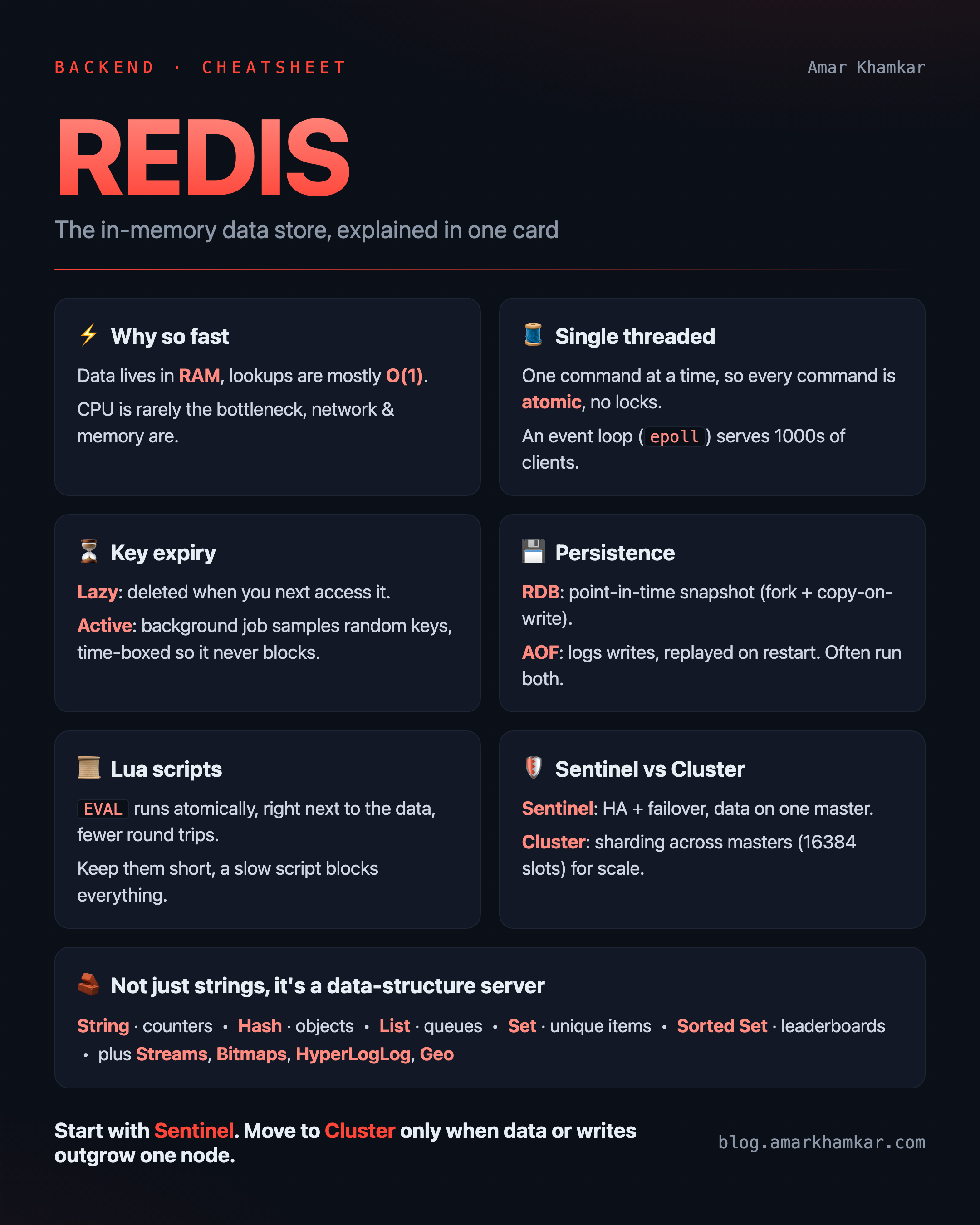
Almost everyone has used Redis at some point, mostly as “that fast cache we put in front of the database”. But Redis is a lot more than a cache, and once you understand how it actually works on the inside, a lot of its design choices start making sense.
In this post I want to go in and out of Redis. How it stays this fast on a single thread, how it deletes expired keys in the background, how persistence works, what Lua scripting gives you, and finally the part that confuses most people, when to use Sentinel and when to use Cluster.
Let’s start from the very beginning.
What is Redis, really
Redis (REmote DIctionary Server) is an in memory data store. At its core it is basically a giant key value dictionary that lives in RAM, and that single fact explains most of its behaviour.
Because the data sits in memory and not on disk, reads and writes are extremely fast. A normal database has to go to the disk, deal with page caches, indexes and so on. Redis just looks up a key in an in memory hash table, which is an O(1) operation most of the time.
But Redis is not only strings. The values can be proper data structures:
- String for simple values, counters, JSON blobs
- Hash for objects with fields, like a user record
- List for queues and stacks
- Set for unique items
- Sorted Set (ZSet) for leaderboards and ranking, where each item has a score
- and a few special ones like Streams, Bitmaps, HyperLogLog and Geo
This is why people call Redis a “data structure server”. You are not just caching strings, you can push to a list, increment a counter or update a leaderboard, all on the server side and all atomic.
The part that surprises everyone: Redis is single threaded
Here is the fact that trips people up. The core of Redis that runs your commands is single threaded. One thread, processing one command at a time.
The first reaction is usually, “how can something single threaded be so fast in 2026 when my laptop has 10 cores?”. It feels backwards. But there are good reasons for it.
Why single threaded actually works here
The data is in memory, so the CPU is rarely the bottleneck. Most Redis commands are simple hash table operations that finish in microseconds. The real cost in a system like this is usually the network and memory, not the CPU doing the work. So adding more threads does not help as much as you would think.
No locks, no race conditions. Because only one thread touches the data, Redis never has to lock anything. There is no risk of two threads corrupting the same key. This makes every single command atomic for free. When you run INCR counter, no other command can sneak in the middle of it. In a multi threaded design you would need locks everywhere, and locks bring their own slowness and bugs.
No context switching. Threads constantly getting scheduled on and off the CPU is not free. A single thread doing tight, small operations avoids all of that overhead.
But then how does it handle thousands of clients at once?
This is the clever part. Redis uses an event loop with I/O multiplexing (epoll on Linux, kqueue on BSD/Mac). Instead of one thread per connection, a single thread watches all the connections and only wakes up for the ones that actually have data ready.
1
2
3
4
5
6
7
8
9
10
11
12
        many clients
   ┌────┬────┬────┬────┐
   │    │    │    │    │
   ▼    ▼    ▼    ▼    ▼
 ┌─────────────────────┐
 │   epoll / kqueue     │   "which sockets are ready?"
 └──────────┬──────────┘
            ▼
   ┌──────────────────┐
   │  single event     │   process one ready command,
   │  loop thread      │   then move to the next
   └──────────────────┘
So one thread can serve tens of thousands of open connections, because at any given moment it is only doing a tiny bit of work for whichever connection has a command ready.
A quick note on the word “client”, because it confused me at first. In Redis, a “client” just means a connection, one open socket. It is not per key, and it is not per application. Your app usually keeps a small connection pool, say 10 connections, and from Redis’s side that pool is 10 clients. Scale out to 40 app instances with 10 connections each, and Redis now sees 400 clients, all multiplexed by that one event loop thread. (The default limit is
maxclients 10000, which is where the “tens of thousands” number comes from.) So one connection can read and write any number of keys, there is no such thing as a connection per key.
One small note, because “Redis is single threaded” is only half true today. Since Redis 6 there is optional multi threaded I/O, where extra threads read and write the raw bytes from and to the sockets, and newer versions have made this more effective and turned it on more aggressively. But this only parallelises the network part. The actual command execution, the bit that touches your data, is still one thread. So the atomicity guarantee is exactly the same, no locks and no race conditions, you just get more help draining the sockets when the network is the bottleneck. So the honest one liner is, Redis runs your commands on a single thread, but it is no longer strictly single threaded end to end.
How Redis deletes expired keys
This is one of my favourite parts, because it shows how the single threaded design shapes everything.
When you set a key with an expiry, like SET session:123 abc EX 60, Redis has to remove it after 60 seconds. The obvious way would be to run a timer for every key, but with millions of keys that would be very expensive. So Redis does something smarter, it uses two strategies together.
1. Lazy (passive) expiration
When you try to access a key, Redis first checks if it has already expired. If yes, it deletes it right then and behaves as if the key does not exist.
This is cheap, but it has a problem. If a key expires and nobody ever touches it again, it will just sit there in memory forever, wasting space. So lazy expiration alone is not enough.
2. Active expiration (the background process)
This is the background job people usually do not know about. Redis runs a periodic task (part of its serverCron, roughly 10 times a second by default, controlled by the hz setting) that actively hunts for expired keys.
Each cycle it does roughly this:
1
2
3
4
5
1. Take a sample of ~20 random keys that have an expiry set.
2. Delete the ones that are already expired.
3. If more than 25% of the sample was expired,
   assume there are many more, and repeat immediately.
4. Otherwise stop for this cycle.
It is a probabilistic approach. Redis does not scan every key, that would be too slow. It samples, and if it keeps finding lots of expired keys it keeps going, otherwise it waits for the next cycle.
And here is where single threaded matters again. This cleanup runs on the same single thread that serves your commands. So Redis deliberately time boxes this work. It will not spend too long deleting keys in one cycle, because if it did, your normal commands would be blocked waiting behind it. It is a careful balance between reclaiming memory and staying responsive.
What about under heavy traffic? Since this cleanup runs on the same main thread as your commands, it is fair to worry that it will steal time from real work during a spike. Redis guards against this by capping how long the active cycle is allowed to run each time (roughly a quarter of its small time budget), so your client commands never get starved by expiry work. The one case to watch out for is an “expiry storm”, where a very large number of keys all expire at the exact same instant. Those deletes still happen on the main thread, so they can cause a short latency spike. If you ever set the same TTL on millions of keys at once, it helps to add a little random jitter to the expiry so they do not all die together.
So the real answer to “how does Redis delete expired keys” is, a little bit lazily when you touch them, and a little bit actively in the background, always being careful not to block the main thread.
Persistence: Redis is in memory, but not only in memory
If everything is in RAM, what happens when the server restarts? By default you would lose all the data. That is why Redis has two persistence options.
RDB (snapshots)
RDB takes a point in time snapshot of the whole dataset and writes it to a single file on disk (dump.rdb). You can configure it to snapshot every few minutes, or trigger it with BGSAVE.
The neat trick is how it avoids blocking. Redis fork()s a child process, and the child writes the snapshot while the parent keeps serving traffic. Thanks to copy on write memory in the OS, the child sees a frozen view of the data without actually copying all of it up front.
- Good for backups and fast restarts.
- Downside, if the server crashes between two snapshots, you lose whatever changed in between.
AOF (Append Only File)
AOF logs every write command to a file. On restart, Redis replays the log to rebuild the dataset. You can control how often it flushes to disk with appendfsync:
always, safest but slowest (flush on every write)everysec, flush once a second, a good balance and the common choiceno, let the OS decide, fastest but least safe
Since the log keeps growing, Redis periodically rewrites it into a compact form that represents the same final state.
Which one?
In practice, many people run both. Modern Redis even supports a hybrid file where an RDB snapshot is used as the base and AOF records the recent changes on top of it. RDB gives you fast restarts and backups, AOF gives you a much smaller window of possible data loss.
What happens on a restart
Since the data lives in memory, a restart has to load it back from disk first, either from the RDB snapshot or by replaying the AOF. This is not instant. The load time grows with the size of your dataset, so a few hundred MB comes back quickly, but many GB can take anywhere from seconds to a few minutes, and AOF replay is usually slower than loading an RDB snapshot. During that load the node is not serving traffic yet, so yes, there is a real cold start cost.
Two things are worth knowing here. In a Sentinel or Cluster setup, a replica keeps serving while one node restarts, so clients are not fully down. And if you run Redis as a pure cache with no persistence at all, a restart is instant, but the cache comes back empty, which can send a sudden flood of misses to your database (a “thundering herd”). So turning persistence off does not remove the restart cost, it just moves it onto your database.
What the managed services hide
If you are on AWS ElastiCache, GCP Memorystore, Redis Cloud, Railway, Upstash and so on, most of this RDB and AOF machinery is handled for you. You mostly just toggle things like “automatic backups” or “enable AOF” in a console, and replication and failover are managed too. It still runs underneath, and the choices still affect your durability and your cost, so it really helps to know what those toggles are actually doing.
Lua scripting: doing many things atomically
So far we have looked at single commands. But sometimes you need a few commands to run together as one unit, and that is where scripting comes in. Redis lets you run Lua scripts on the server using EVAL (and EVALSHA for a cached script). The script runs on the server, right next to the data.
Why is this useful? Two reasons.
Atomicity. Remember Redis is single threaded, so while your Lua script is running, nothing else runs. The whole script executes as one atomic unit. This is perfect for “read a value, decide something, then write” logic where you cannot afford another client to jump in the middle.
Fewer round trips. Instead of sending five commands from your app and paying the network cost each time, you send one script that does all five on the server.
A fair question here, “but I am still calling redis.call five times inside the script, so how is that fewer round trips?”. The trick is where those calls happen. The network cost is between your app and Redis, not inside Redis. Five separate commands from your app means five round trips over the network. One EVAL is a single round trip, and the five redis.calls inside it run right inside the Redis process, in memory, with no network involved. So the number of redis.calls in the script does not cost you any network at all.
A classic example is an atomic rate limiter:
1
2
3
4
5
6
7
8
9
-- KEYS[1] = the rate limit key, ARGV[1] = limit, ARGV[2] = ttl seconds
local current = redis.call("INCR", KEYS[1])
if current == 1 then
  redis.call("EXPIRE", KEYS[1], ARGV[2])
end
if current > tonumber(ARGV[1]) then
  return 0   -- blocked
end
return 1     -- allowed
The increment, the expiry and the check all happen together, with no chance of another request slipping in between.
One important caution, because the script blocks the single thread, a slow Lua script blocks the entire server. So keep scripts short and never put slow loops in them. (Newer Redis also has Functions via the FUNCTION command, which is basically a more structured evolution of the same idea.)
Making Redis reliable and big: replication, Sentinel, Cluster
A single Redis node is great until it dies, or until your data no longer fits in one machine’s memory. This is where the interesting architecture decisions come in.
Replication first
Redis supports replication, where one master node has one or more replicas that keep a copy of its data. Replication is asynchronous, the master keeps serving writes and streams the changes to the replicas.
Replicas are useful for two things, spreading out read traffic, and having a standby copy in case the master fails. But replication by itself does not give you automatic failover. If the master dies, someone (or something) still has to promote a replica. That is exactly the gap Sentinel fills.
Redis Sentinel: high availability
Sentinel is a separate process whose only job is to watch your Redis master and replicas and handle failover automatically.
1
2
3
4
5
6
        ┌───────────┐   monitors    ┌──────────┐
        │ Sentinel  │──────────────▶│  Master   │
        │ Sentinel  │──────────────▶│ Replica 1 │
        │ Sentinel  │──────────────▶│ Replica 2 │
        └───────────┘               └──────────┘
     (usually 3 sentinels for a proper quorum)
What it does:
- Continuously checks if the master is alive.
- If a quorum of sentinels agree the master is down, they elect a replica and promote it to master.
- They update the other replicas to follow the new master.
- Clients ask Sentinel “who is the master right now?”, so they always connect to the correct node even after a failover.
The key thing to understand about Sentinel, it gives you high availability, but not scaling. All your data still lives on one master. Sentinel just makes sure that if the master dies, a replica takes over quickly without a human waking up at 3am.
Redis Cluster: sharding and scaling
Sentinel keeps one dataset alive. Cluster is for when the dataset itself is too big for one machine, or the write throughput is more than one node can handle.
Cluster shards the data across multiple master nodes. It splits the keyspace into 16384 hash slots, and each master owns a range of those slots. The slot for a key is decided by a hash of the key, CRC16(key) % 16384.
1
2
3
4
5
6
      16384 hash slots, split across masters

   Master A            Master B            Master C
  slots 0-5460       slots 5461-10922    slots 10923-16383
     │                   │                   │
  Replica A           Replica B           Replica C
Some important points:
- There is no central proxy. Clients are “cluster aware”. If you send a key to the wrong node, that node replies with a
MOVEDredirect telling you the right one, and a good client caches this map. - Each master usually has its own replica, so Cluster also gives you high availability, not just scaling.
- Multi key operations are limited. A command touching multiple keys only works if all those keys live in the same slot. You can force related keys into the same slot using a hash tag, like
{user:123}:profileand{user:123}:sessions, where only the part inside{}is hashed.
The throughput this unlocks
This is worth saying plainly, because it is the reason Redis is reached for at scale. A single Redis node already does well over a hundred thousand operations per second. Once you shard with Cluster, throughput scales roughly linearly with the number of master nodes, so a real cluster comfortably handles millions, and up to the ten million operations per second range, of reads and writes.
A normal database simply cannot match this on its own. To get a relational database anywhere near that write throughput, you have to explicitly shard it yourself, split the data across many database servers, route every query to the right shard, and give up easy cross shard joins and transactions, all of which is a big, manual, error prone project. Redis was built around sharding from the start (those 16384 slots), so it hands you horizontal scale as a config choice rather than a re architecture. That combination, everything in memory plus near linear scaling with Cluster, is exactly why Redis sits in front of databases to soak up the traffic they cannot take directly. (If you want to see how this saves the database during a traffic spike, I wrote a separate post on request coalescing and cache stampedes.)
Sentinel or Cluster: how to actually decide
This is the decision people get stuck on, so let me make it simple. Ask yourself two questions.
1. Does my data fit comfortably in one node’s RAM (with room to grow)? 2. Can one node handle my write throughput?
-
If yes to both, and you only want protection against the master dying, use Sentinel. It is simpler to run and reason about, and you keep all the multi key commands and transactions working normally, because everything is on one node.
-
If no to either, meaning your data is too big for one machine or you need to scale writes horizontally, use Cluster. You get sharding across many masters, and each shard still has its own replica for HA.
A few practical notes:
- Cluster is more complex to operate and it restricts multi key operations to a single slot. Do not reach for it just because it sounds more “scalable”. Complexity has a cost.
- If you are on a managed service like AWS ElastiCache, GCP Memorystore or Redis Cloud, a lot of this Sentinel vs Cluster machinery is handled for you, and you mostly just pick “replication” or “cluster mode” in a dropdown. But it helps a lot to know what is happening underneath.
- A common path is to start with a single node, add replicas plus Sentinel when you need HA, and move to Cluster only when you genuinely outgrow one machine.
My honest rule of thumb, start with Sentinel, move to Cluster only when the data or the write load forces you to. Most applications never actually need Cluster.
Where Redis fits (common use cases)
Just so this does not stay too theoretical, here are the places I actually reach for Redis:
- Caching, the classic one, put it in front of a slow database or API.
- Session store, store user sessions with a TTL so they expire on their own.
- Rate limiting, using counters with expiry (the Lua example above).
- Queues and background jobs, using lists or streams.
- Leaderboards and ranking, using sorted sets.
- Pub/Sub and real time, for chat, notifications and live updates.
- Distributed locks, to coordinate work across many app servers.
Wrapping up
If I had to compress the whole thing into a few lines, it would be this.
Redis is fast because the data lives in memory and one thread runs everything, which also makes every command atomic for free. It uses an event loop to serve thousands of clients on that one thread. It deletes expired keys partly lazily on access and partly through a careful background job that is time boxed so it never blocks you. It stays durable with RDB snapshots and the AOF log. Lua scripts let you run multi step logic atomically right next to the data. And when a single node is not enough, Sentinel keeps it alive and Cluster makes it bigger.
Once you see it this way, Redis stops feeling like a magic fast cache and starts feeling like a very well thought out piece of engineering, where almost every feature traces back to that one decision of keeping the core single threaded.
If there is any part you want me to go deeper into, tell me in the comments and I can write a follow up.